Showing posts with label Repair Tools. Show all posts

Free and Portable Repair Tools


Here are some of Portable, Free and Useful Tools that I used in different type of computer problems. That might be also useful to you.

Advisor  – A computer diagnostic tool  that show a detailed profile of your installed software and hardware, missing Microsoft hotfixes & anti-virus status.

ATF-Cleaner – Simple tool that removes files from your temp folder, like cookies and temp files

Autoruns – This utility shows you what programs are configured to run during system bootup or login, and shows you the entries in the order Windows processes them. similar to the run command “msconfig” but much more advanced; you used to turn off programs from running on startup.

BlueScreenViewer – Scans all your minidump files created during 'blue screen of death' crashes, and displays the information about each and every crashes. When your computer gets the BSOD (blue screen of death) it creates a log file. This program is great at making it very readable and understand what caused the bluescreen.

CCleaner – a tool similar to ATF-cleaner but much more advanced and actually needs installing. ATF-cleaner runs straight from an executable

CPU-Z - a freeware system monitor application for Windows that detects the central processing unit, RAM, motherboard chipset, and other hardware features of a modern personal computer, and presents the information in one window.

FixWin – a small application that repair & fix common Windows annoyances & issues. Similar to Dial-A-Fix but that only works with XP. This tool works with Vista and I believe Windows 7 as well

GMER – a good program that detects and removes rootkits.

HiJackThis – a free utility that scan your computer to find settings that changed by spyware, malware, or other unwanted programs.

HitmanPro35 – a Free utility that Detect and Clean virus, adware, malware, rootkit, bot, worm and trojan infection. Plus it is always updated

Mbam-clean – sometimes Malwarebytes gets corrupted by a virus as well and this is a great tool that removes it completely so it can be installed at a later time without issues

MCPR.EXE – McAfee Products removal tools

Norton Removal Tools – completely removes everything Norton AV related; very useful tool

Process Explorer – if you have seen Windows Task Manager this is what it is but it says a LOT more information and has a lot more functionality; fairly simple to use.

Remove Fake Antivirus – good for removing rogue AntiVirus which are fake AVs that try and steal your identity; NEVER CLICK “BUY NOW” on an AV menu without googling the name first to see if its legit

Revo Uninstaller – great program that works like add/remove in windows but much better and easier to use

RKill - got a lot of popups saying your computer is infected and can’t get them off? Run this tool to kill practically everything until you restart your comp; after running this run malwarebytes or hitmanpro or some sort of AV scanner

TDSSKiller – Rootkit removal tool that I used and it’s constantly updated.

WinsockxpFix – If you have an unexplained network problem after removing software use this. A last resort if your Internet connectivity has been corrupted due to invalid or removed registry entries. It can often cure the problem of lost connections after the removal of Adware components or improper uninstall of firewall applications or other tools that modify the XP network and Winsock settings

Terminate active Malware with RKill


Malware this days are getting smarter and harder to remove, some malware infections will detect that you have launched an anti-malware tool such as MalwareBytes and close it down as soon as you open it, which makes malware removal much harder. This is the exact situation Rkill is designed for.

Rkill is a freeware and portable tool designed to terminate active malware processes allowing you to use other removal tools. Rkill is made by Lawrence Abrams.

RKill just kills processes, imports a Registry file that removes incorrect file associations and fixes policies that stop us from using certain tools. Then it kills Explorer.exe so it will restart and enable some of the Registry changes. When done, RKill will then create a log listing all processes that were terminated while the program was running. 

Since RKill only terminates processes, after running it you should not reboot your computer as any malware processes that are set to start automatically, will just start up again. Instead, after running RKill you should scan your computer using your malware removal tool of choice (MalwareBytes' Anti-Malware, SuperAntiSpyware, and Dr.Web CureIt)

Rkill is available in 4 different extensions. An .EXE, .COM, .SCR and a .PIF file. The reason why is because some malware will block .EXE files in an attempt to prevent you from running other malware removal tools, so this gets around that problem.

Downloads

Note: When you run RKill you may see a message from the malware stating that the program could not be run because it is a virus or is infected. Ignore it and try to run Rkill with different extension. If it fails try to boot in Windows SafeMode then try again. And if it also fail try to run COMBOFIX in safemode and see if can remove that nasty malwares installed on your PC.

How to Remove Fake Antivirus


Remove Fake Antivirus or RFA  is a free tools used to remove the most popular Rogue antiviruses. Rogue AV is a type of virus/malwares which disguises itself to be an antivirus. It infects your computer when you accidentally click a link in a website which will download the malware into your computer and run automatically when your windows boot. It scan the infected computer and produces fake alert warnings. It convinces you that your computer is in danger and urge you to purchase a copy of the fake antivirus. 

Here's a list of Rogue AV that can remove by RFA (Remove Fake Antivirus v1.69)
  • Additional Guard
  • Alpha Antivirus
  • Antivir 2010
  • Antivirus 2009
  • Antivirus 2010
  • Antivirus 360
  • Antivirus 7
  • Antivirus 8
  • Antivirus BEST
  • Antivirus GT
  • Antivirus Live
  • Antivirus Pro 2009
  • Antivirus Pro 2010
  • Antivirus Soft
  • Antivirus Suite
  • Antivirus System Pro
  • Anti-Virus-1
  • Braviax
  • CleanUp Antivirus
  • Control Center
  • Cyber Security
  • Defense Center
  • Desktop Defender 2010
  • Digital Protection
  • FraudTool.MalwareProtector.d
  • Green AV
  • IGuardPC or I Guard PC
  • Internet Security 2010
  • Live PC Care
  • Malware Defense
  • Malware Doctor
  • MS Antispyware 2009
  • My Security Shield
  • PC Antispyware 2010
  • Personal Antivirus
  • Personal Security
  • Protection Center
  • Security Antivirus
  • Security Center
  • Security Central
  • Security Master AV
  • Security Tool
  • Security Toolbar
  • Spyware Guard 2008
  • Sysinternals Antivirus
  • System Guard 2009
  • System Security
  • System Security 2009
  • Total PC Defender 2010
  • Total Security 2009
  • Total XP Security
  • Vista Antivirus Pro 2010
  • Vista Guardian 2010
  • Vista Internet Security 2010
  • Vista Security Tool 2010
  • Windows Enterprise Suite
  • Windows Police Pro
  • Windows Protection Suite
  • Windows System Suite
  • WinPC Defender
  • Winshield2009.com
  • XP Guardian
  • XP Internet Security 2010
  • XP Smart Security 2010
  • Your PC Protector
Download

If this doesn't solve your problem try to this solution then scan with Kaspersky Virus Removal Tools.

Virus Effect Remover


Virus Effect Remover is a tool which helps you to remove the effect of viruses from the Windows Registry and File System. It also detects the registry error caused by viruses and enables the Blocked content like Task manager, registry editor, folder option, etc.This software enables your Admin restricted application and remove the changes which a virus does to protect itself.

It enables :

1: Registry Tools
2: Task manager
3: Group Policy Editor
4: Run command option in start Menu
5: Folder Option in Explorer & Control panel
6: Update check
7: File Menu
8: Find Menu
9: Log Off
10: Task Bar
   

5 Free Alternatives to Nero CD/DVD Burner


1. CDBurnerXP is a free application to burn CDs and DVDs, including Blu-Ray and HD-DVDs. It also includes the feature to burn and create ISOs, as well as a multilanguage interface. Everyone, even companies, can use it for free. It does not include adware or similar malicious components.


2. DeepBurner (Free Version) is a totally free, yet more advanced than other software calling itself "professional", this version of our CD/DVD burner is for your own personal use.There is also Portable edition that works straight from your removable media, whether it's a USB flash drive, compact flash card.

Free version Features:
  • Burn data CDs/DVDs 
  • Burn AudioCDs     
  • Create and burn ISO images     
  • Bootable CD/DVD support

3. ImgBurn is a lightweight CD / DVD / HD DVD / Blu-ray burning application that everyone should have in their toolkit! ImgBurn can also burn files and data directly to CD/DVD. It has several 'Modes', each one for performing a different task: 
  • Read - Read a disc to an image file
  • Build - Create an image file from files on your computer or network - or you can write the files directly to a disc
  • Write - Write an image file to a disc
  • Verify - Check a disc is 100% readable. Optionally, you can also have ImgBurn compare it against a given image file to ensure the actual data is correct
ImgBurn supports a wide range of image file formats - including BIN, CUE, DI, DVD, GI, IMG, ISO, MDS, NRG and PDI.

It can burn Audio CD's from any file type supported via DirectShow / ACM - including AAC, APE, FLAC, M4A, MP3, MP4, MPC, OGG, PCM, WAV, WMA and WV.

You can use it to build DVD Video discs (from a VIDEO_TS folder), HD DVD Video discs (from a HVDVD_TS folder) and Blu-ray Video discs (from a BDAV / BDMV folder) with ease.
 
4. InfraRecorder is a free CD/DVD burning solution for Microsoft Windows. It offers a wide range of powerful features. A simple and easy to use application interface.

Some InfraRecorder Features

    * Supports recording to dual-layer DVDs.
    * Blank (erase) rewritable discs using four different methods.
    * Record disc images (ISO and BIN/CUE).
    * Fixate discs (write lead-out information to prevent further data from being added to the disc).
    * Create disc copies, on the fly and using a temporary disc image.
    * Import session data from multi-session discs and add more sessions to them.
    * Save audio and data tracks to files (.wav, .wma, .ogg, .mp3 and .iso).


5. FinalBurner is a freeware alternative to expensive CD and DVD burners. You can create data, audio, and video disks and burn them onto any type of media, such as CD R/RW, DVD+R/RW, DVD-R/RW, and DVD DL. No tedious or confusing configuration needed. You just select a few main settings and start burning. FinalBurner's artificial intelligence will find the perfect recording balance.

Main features:
  • Burn Data CD/DVD (CD R/RW, DVD+R/RW, DVD-R/RW, DVD DL, HD-DVD, Blu-Ray, etc.)Autorun menu designer
  • Burn Audio CD (Import *.wav; *.mp3; *.ogg; *.mid; *.wma; *.aac; *.mp4; *.m4a; *.xm; *.mod; *.s3m; *.it; *.mtm; *.mo3 audio files.)
  • Burn Video DVD (Import AVI, DIVX, XVID, MP4, MPG, WMV, ASF, MOV, FLV, etc. Capture from Web cam, TV tuner, DV, etc.)
  • AudioCd Ripper


How to Remove "You may be a victim of software counterfeiting"

Do you have this kind of pop-up saying that " You may be a victim of software counterfeiting". Don't panic, relax there are two ways to remove that annoying pop-up, but first lets find out what causes this problem? This problem occurs when you update your windows Xp over the internet and after it will show a notification that say “You may be a victim of software counterfeiting” and “This copy of windows does not pass genuine Windows validation”. The only reason is because you update a non Genuine copy of windows XP. This is called Windows Genuine Advantage or (WGA) it is an anti-piracy system created by Microsoft that enforces online validation of the licensing of several recent Microsoft Windows operating systems when accessing several services, such as Windows Update, and downloading Windows components from the Microsoft Download Center.

OK, here's a two methods to fix this problem.

Method 1: The Long cut!


1. Launch Windows Task Manager. (by pressing Ctrl+Alt+Del keys)
2. Locate the process “WgaTray.exe” and press end task.
3. then restart your pc and Log-in into the Safe Mode by Press F8 before windows boots) and delete the file WgaTray.exe from c:\Windows\System32
4. Delete also WgaTray.exe from c:\Windows\System32\dllcache
5. then Type regedit in Run (Win+R) to open Registry Editor, navigate to
HKEY_LOCAL_MACHINE\SOFTWARE\Microsoft\Windows NT\CurrentVersion\Winlogon\Notify key
6. then Delete the folder WgaLogon and all of its contents.
7. After that Restart the PC normally. and Its done!


Method 2: The shortcut
Just download and run RemoveWGA.exe
and its done!

Fix common Windows annoyances with FixWin Utility

 FixWin is a portable freeware application that repair & fix some of the most common Windows annoyances & issues which maybe faced by a Windows Vista & Windows 7 user.

Some of the problems that can fix by "Fixwin Utility"

   1. Recycle bin icon missing from desktop
   2. Games Explorer is not working or unable to open Games Explorer folder.
   3. Windows Media Player does not show slideshow correctly
   4. Enables folder option.
   5. Fixes show hidden files,folders & drives.
   6. Restore the windows sidebar.
   7. Fixes Recycle Bin icon, when it doesn't refresh automatically.
   8. Explorer.exe won't start at boot in windows.
   9. Device Manager is not working properly.
  10. Aerosnap is not working.

It has been tested on Windows 7 & Vista, 32-bit and 64-bit versions.


FixWin 1.2

Protect your USB Drives from Malware and Trojan

Panda USB Vaccine is a freeware solution designed to protect against malware infections due to autorun feature of Windows OS . It offers a double layer of preventive protection, allowing users to disable the AutoRun feature on computers as well as on USB drives and other devices:

Vaccine for computers: This is a ‘vaccine' for computers to prevent any AutoRun file from running, regardless of whether the device (memory stick, CD, etc.) is infected or not.

Vaccine for USB devices: This is a ‘vaccine' for removable USB devices, preventing the AutoRun file from becoming a source of infection. The tool disables this file so it cannot be read, modified or replaced by malicious code.

This is a very useful tool. This provides users with a simple way of disabling AutoRun feature, offering a high degree of protection against infections from removable drives and devices.

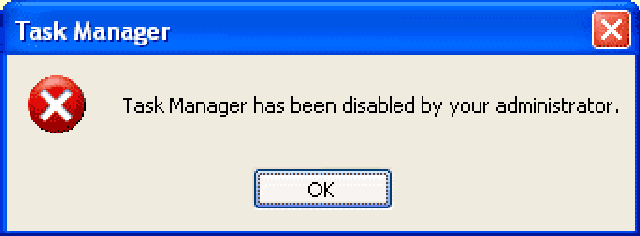
Instant solution for disable Task Manager


This error message appears due to restriction placed in the Windows Registry. One can easily enable Task Manager by editing some registry settings. But for a normal user editing registry is not easy and a bit risky. Here's where Task Manager Fix comes in a Freeware system utility designed to fix Task Manager disabled by spywares and trojans in a click of a button.

.Source: Official Site

Kaspersky Virus Removal Tool

The Kaspersky Virus Removal Tool is a Freeware application designed to be another virus scanner and detection software from Kaspersky. The product will scan the specified locations for any virus threats and remove them. Kaspersky Virus Removal Tool 2010 does not provide resident protection for your computer. After disinfecting a computer, you are supposed to remove the tool and install a full version of antivirus software.


Kaspersky Virus Removal Tool does not have a function allowing to update its antivirus database. The only way to update its database is to download it again from Kaspersky Lab servers and install it. Take note that it is also necessary to uninstall older version of Kaspersky Virus Removal Tool 2010 before installing a newer one. After successful disinfection of a computer, it is recommended to uninstall Kaspersky Virus Removal Tool  and install a fully-functional antivirus application.

Advantages:
  • Simplified interface.
  • Can be installed to an infected computer (Safe Mode supported).
  • Composite scan and disinfection system: signature detection and heuristic analyzer.
  • Gathering system information and interactive creation of scripts for disinfection.
General functions:
  • Automatic and manual removal of virus, Trojans and worms.
  • Automatic and manual removal of Spyware and Adware modules.
  • Automatic and manual removal of all types of rootkits.
Note that Kaspersky Virus Removal Tools is unsuitable for providing resident protection on computers.
The only function of the tool is scan-on-demand. It cannot work in real-time mode. 

Caution: Your computer may crash to BSOD, hang, etc. in the result of simultaneous execution of more than one version of Kaspersky Virus Removal Tool 2010.

Latest Kaspersky Virus Removal Tool

Track down the cause of BSOD


BlueScreenView is a small, portable and freeware application that scans all your minidump files created during 'blue screen of death' crashes, and displays the information about all crashes in one table.

For each crash, BlueScreenView displays the minidump filename, the date/time of the crash, the basic crash information displayed in the blue screen, and the details of the driver or module that possibly caused the crash.


 Download Here (48kb)
For More Information Click Here
 

Popular Posts

PC Mediks Copyright © 2009 BeMagazine Blogger Template is Designed by Blogger Template